
Quick Rules
- Write it the way it sounds:
kotha→ কথা,somoy→ সময়,doya kore→ দয়া করে. - A capital letter gives a different letter:
t=ত /T=ট,d=দ /D=ড,Sh=ষ. - Conjuncts form by themselves:
uttor→ উত্তর,kkhoma→ ক্ষমা,gram→ গ্রাম. - Daari । =
., chandrabindu =^, taka sign =$, and digits 0-9 become Bangla numerals.
For the complete key map, see the Phonetic Bangla Keyboard page. To measure your typing speed take the Typing Test, and to check spelling use the Spell Checker.
About Avro Keyboard
Avro Keyboard (অভ্র কিবোর্ড) is free and open-source Bangla typing software, released on 26 March 2003, running on Windows, Linux, macOS, Android and iOS. Its best-known feature is Avro Phonetic: write the English spelling and get Bangla.
The online version on this page runs on an open-source engine that follows those same phonetic rules — write in your browser with nothing installed, then copy the text or download it as a file. To take the text into Bijoy (SutonnyMJ), use Unicode to Bijoy.
The Avro Keyboard Layout
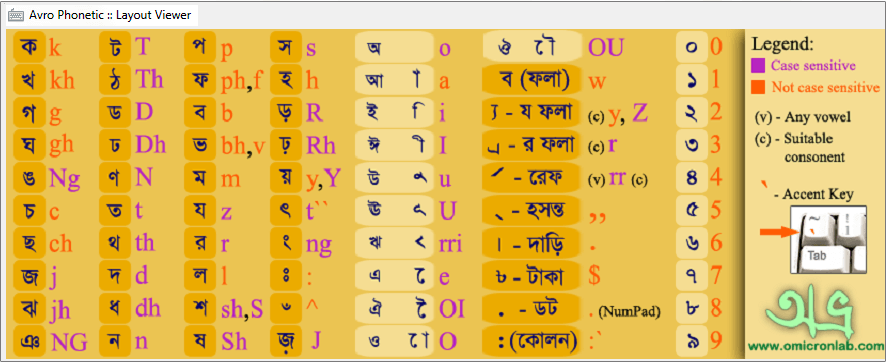
The complete map, with the key for every letter and the rules for conjuncts, is on our Phonetic Bangla Keyboard page.
Frequently Asked Questions
Is this the official Avro software?
No — "Avro" is OmicronLab's software and trademark. This page is an independent online typing tool that follows the same phonetic rules and runs directly in your browser.
Is my text sent anywhere?
No — the typing and conversion happen entirely in your browser. Until you copy or download it, the text stays with you.